
Preparing Your Store for BFCM: A Guided Selling & Product Data Checklist
On the busiest days of the year, visitors arrive in a hurry, often on mobile, often buying for someone else. The traffic doubles. Shopper patience doesn’t.If they can’t find the right product in a few taps, they leave for a store that helps them faster. The stores that win BFCM aren’t only the ones with the deepest discounts; they’re the ones that make choosing easy.
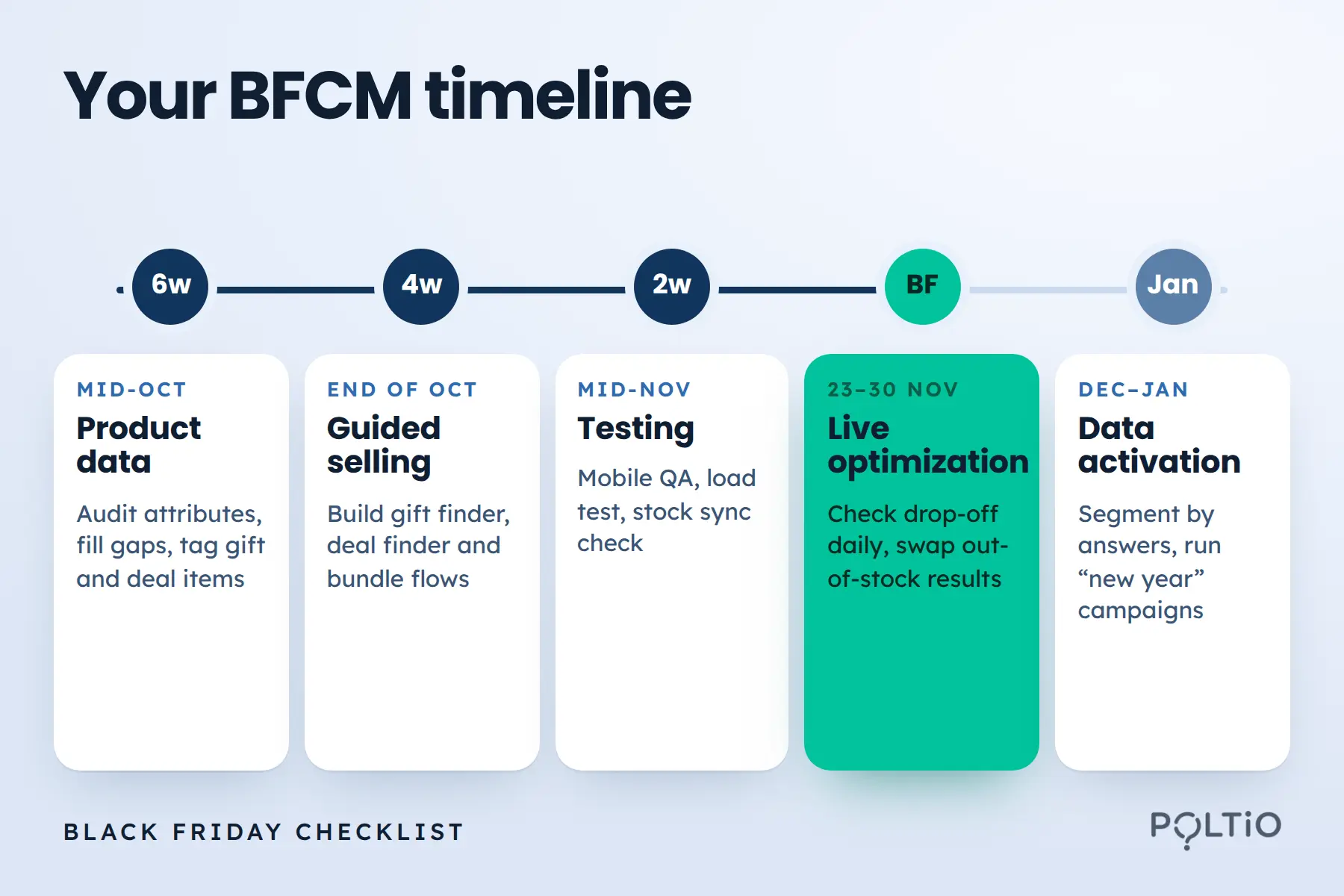
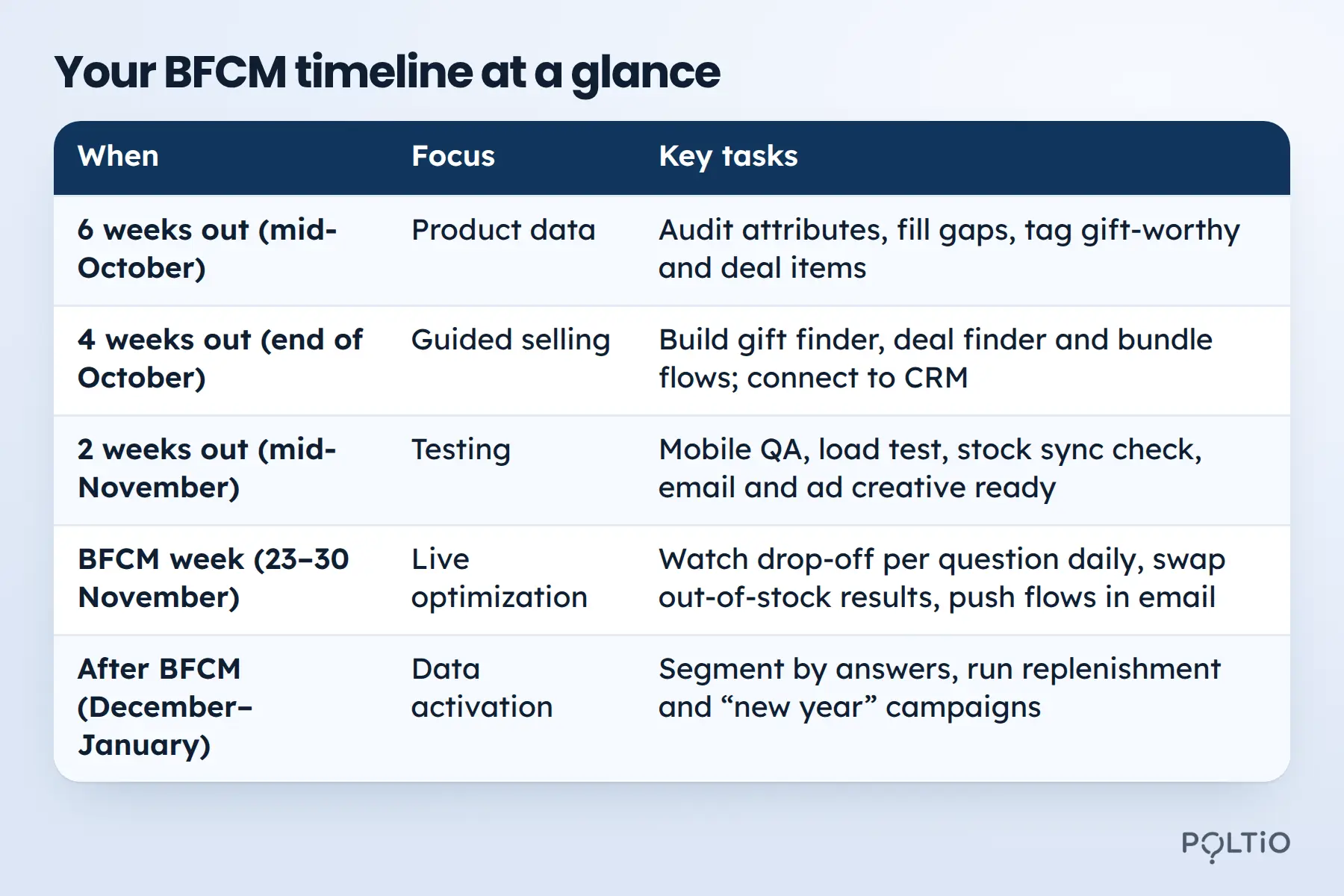
Quick answer: To prepare your store for Black Friday and Cyber Monday (BFCM), clean and enrich your product data at least six weeks ahead, launch guided selling flows such as gift finders and deal finders four weeks ahead, test everything on mobile two weeks ahead, and plan how you’ll use the zero-party data you collect in January. In 2026, Black Friday falls on 27 November and Cyber Monday on 30 November.
Your BFCM timeline at a glance
Step 1: Get your product data BFCM-ready (6 weeks out)
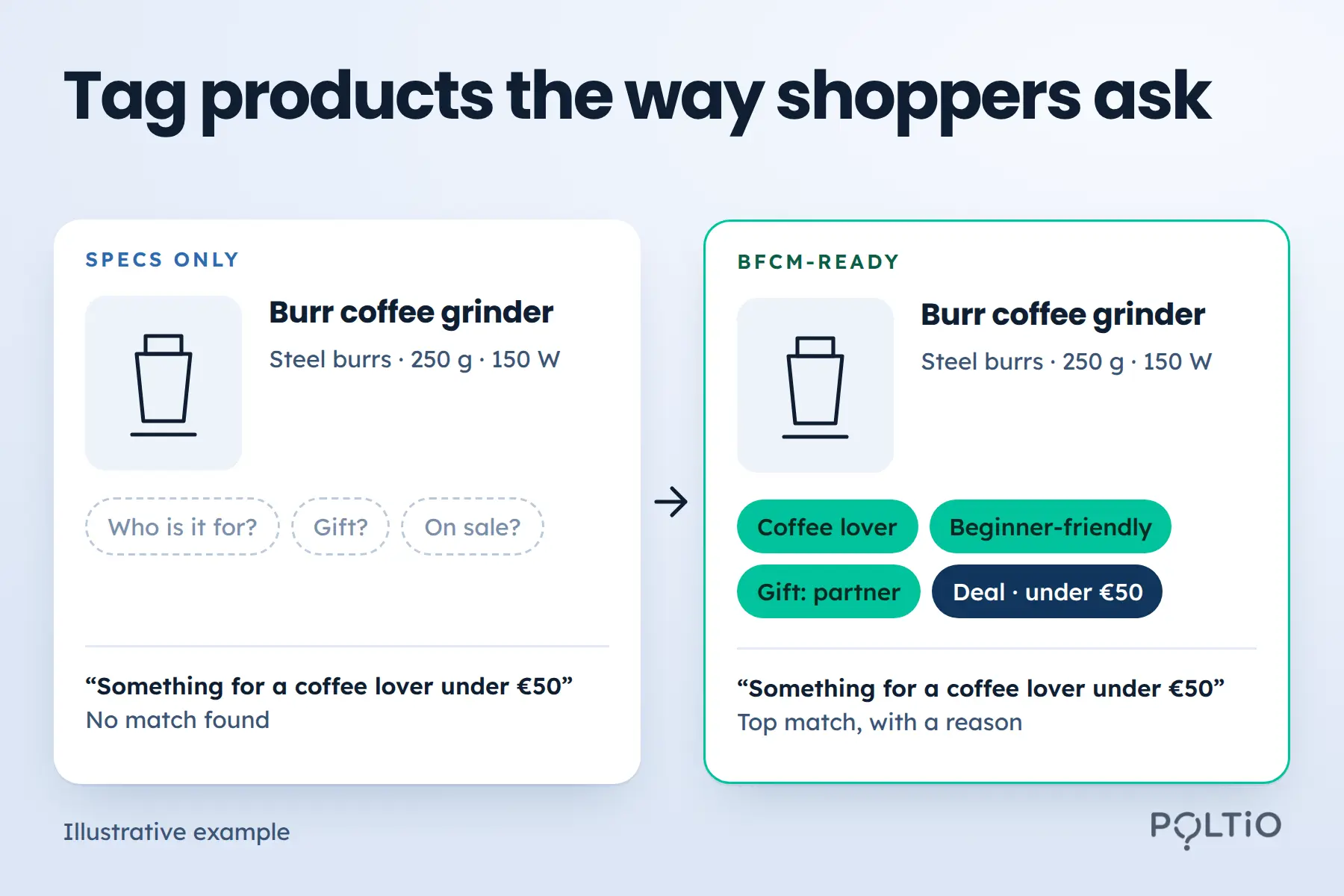
Every discovery tool you run in November, from search to filters to guided selling, is only as good as your product data. A gift finder can’t recommend “something for a coffee lover under €50” if no product is tagged for coffee lovers.
Use this checklist to close the gaps:
- Audit your top 20% of products. These usually drive most BFCM revenue. Check that every one has complete titles, descriptions, images and attributes.
- Fill missing attributes. Size, color, material, compatibility and age range should never be blank on a bestseller.
- Add use-case attributes. Go beyond specs: “good for small spaces”, “beginner-friendly”, “travel-size”. These are the words shoppers use when they answer questions.
- Tag gift suitability. Recipient (partner, parent, kid, colleague), occasion and price band.
- Tag deal items. Make discounted products machine-readable so flows can surface them.
- Group bundle candidates. Products that sell well together, such as a camera, memory card and bag.
- Check stock sync. Recommending a sold-out product on Black Friday is worse than recommending nothing.
- Standardize naming. “Navy”, “navy blue” and “dark blue” should map to one value.
If your catalog is large, AI-assisted product tagging can do much of this in bulk. Review the output for your top sellers by hand.
Related: Why Product Data Enrichment Is the Missing Layer Behind Great Recommendations
Step 2: Launch guided selling flows (4 weeks out)
Guided selling is a way of helping shoppers choose by asking them a few questions and recommending matching products. During BFCM it does two jobs: it gets hurried shoppers to the right product faster, and it helps gift buyers who don’t know the product category at all.
Three flows cover most BFCM needs:
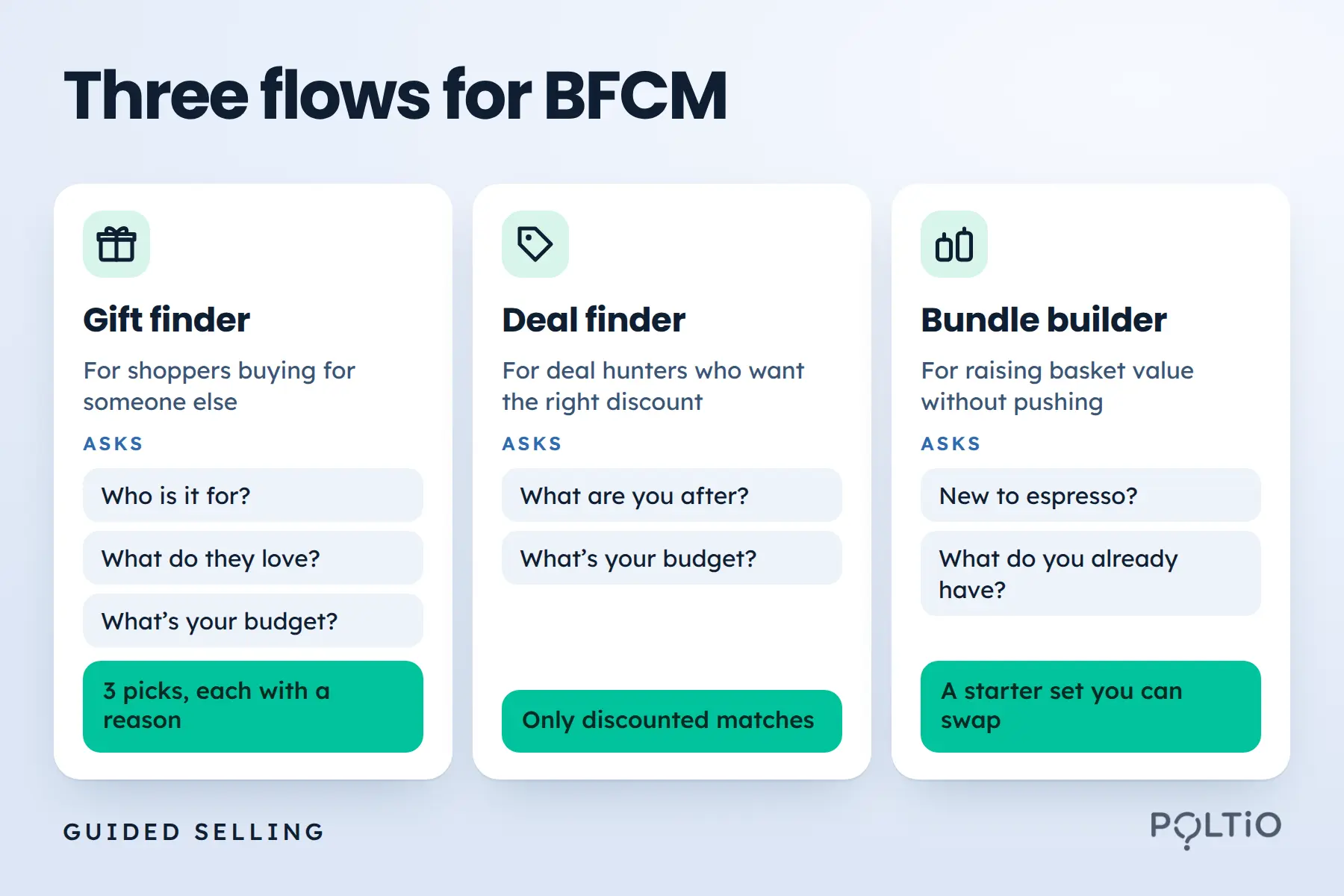
The gift finder
Gift buyers are shopping for someone else’s taste, which makes them the least confident shoppers of the year. A gift finder asks about the recipient, not the buyer.
- Ask: Who is it for? What do they love? What’s your budget?
- Show 3 results maximum, each with a one-line reason (“Great for someone who hosts dinners”)
- Add a “send this list to myself” option to capture email
- Place it on the homepage, in the main navigation and in every holiday email
The deal finder
Deal hunters want the best discount on the right product, not a page of 400 markdowns.
- Ask what they’re shopping for and their budget, then show only discounted matches
- Sort by savings or relevance, not by margin alone
- Use it as the landing page for BFCM ads so paid traffic starts in a guided journey
The bundle builder
Bundles raise average order value when they feel helpful rather than pushy.
- Recommend a starter set based on answers (“New to espresso? Here’s what you need”)
- Show the bundle price next to the sum of single prices
- Let shoppers swap items within the bundle
Across Poltio customers, guided flows lift basket value by about 20% on average (usepoltio.com), and a bundle builder is one of the most direct ways to capture that lift.
Step 3: Test everything (2 weeks out)
- Complete every flow on at least two iOS and two Android phones
- Check load time: the widget shouldn’t slow your page on peak traffic
- Confirm the product feed syncs stock and prices at least hourly
- Prepare a fallback result for every path so no shopper sees an empty page
- Check that answers reach your CRM or email platform correctly
- Brief customer service on how the flows work
Step 4: Optimize live during BFCM week
BFCM week is not the time to rebuild flows, but small daily fixes pay off.
- Check drop-off per question every morning. If one question loses more than a third of shoppers, simplify or remove it.
- Replace out-of-stock results the same day.
- Feature the gift finder more prominently as shipping cut-off dates approach.
- Push the flow in every BFCM email: “Not sure what to get? Find it in 30 seconds.”
Step 5: Turn holiday traffic into January revenue
BFCM brings more first-time visitors than any other week. Most of them are anonymous, and most won’t come back on their own. The answers they give in your guided flows are the most valuable thing they leave behind.
That’s zero-party data: information customers intentionally share with a brand, such as preferences, needs and purchase intent. Unlike tracked behavior, it tells you why someone shopped.
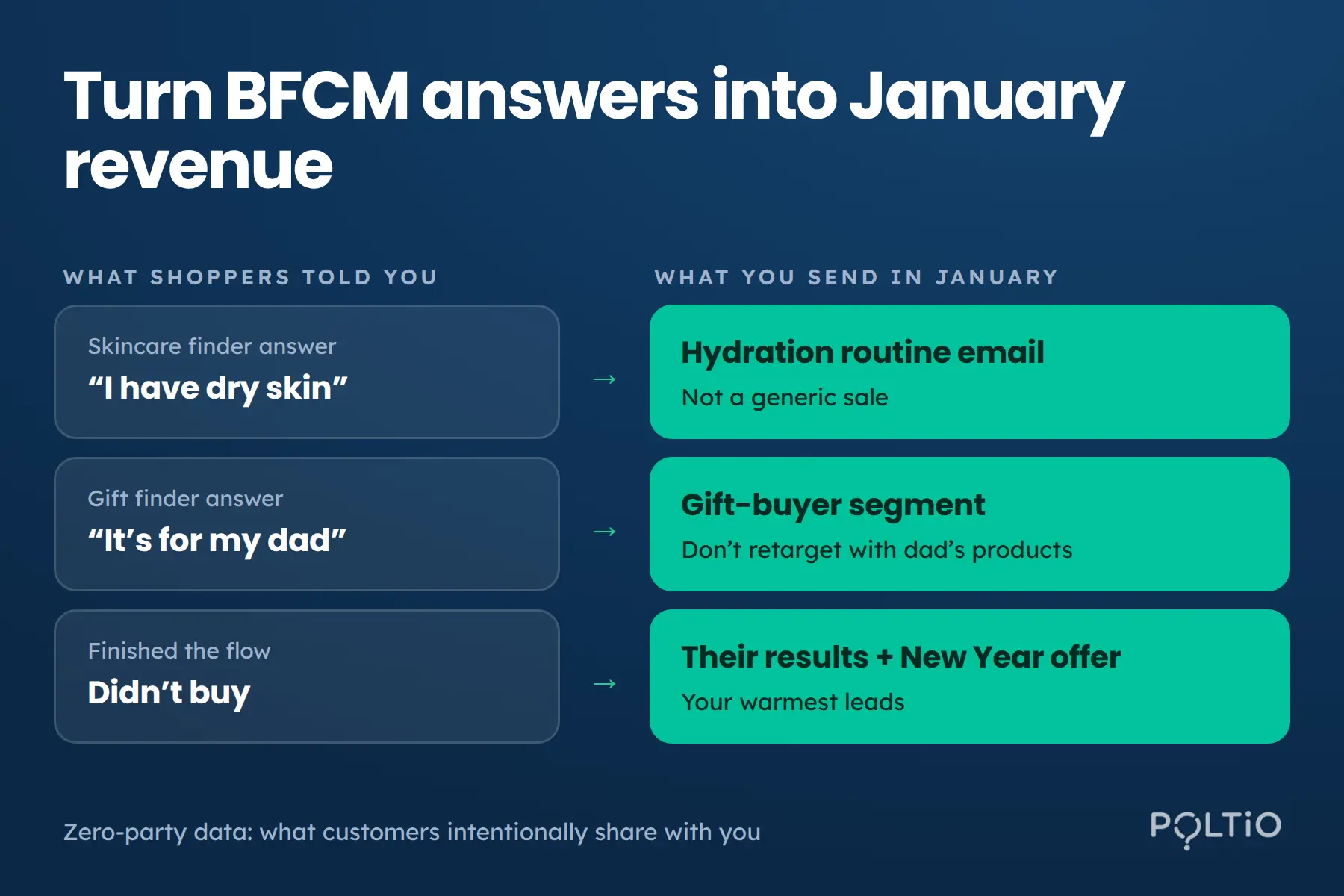
Use it after BFCM:
- Segment by stated need. Everyone who told your skincare finder they have dry skin gets a January hydration routine email, not a generic sale.
- Separate gift buyers from self-buyers. A gift buyer’s answers describe the recipient; don’t retarget them with products for themselves.
- Time replenishment. If a shopper bought a 3-month supply, plan the reminder.
- Invite non-buyers back. Shoppers who finished a flow but didn’t buy already told you what they want. Send them their results with a New Year offer.
Poltio reports up to 7x higher email click-through rates for its customers (usepoltio.com).
Related: Zero-Party Data Strategy: How to Collect and Use It
Frequently asked questions
When should I start preparing for BFCM?
Start six weeks before Black Friday with product data, because every other tool depends on it. For 2026, that means mid-October, with guided selling flows live by the end of October.
What is a gift finder?
A gift finder is a short guided flow that asks about the gift recipient (who they are, what they enjoy, the budget) and recommends matching products. It helps shoppers who don’t know the product category well.
Can I launch guided selling in time for Black Friday?
Yes. With an AI-assisted platform connected to your product feed, a first flow can go live in days. Launch at least two weeks before BFCM to leave time for mobile testing.
How many questions should a BFCM flow have?
Keep it to 3 or 4. BFCM shoppers are in a hurry, so every question must clearly narrow the results.
What should I do with the data after BFCM?
Segment customers by what they told you, separate gift buyers from self-buyers and send personalized follow-ups in January. Shoppers who completed a flow but didn’t buy are your warmest leads.
Make this your easiest BFCM yet. Book a Poltio demo and launch a gift finder before Black Friday, or try the demo store to see one in action.
Related reading: What Is a Guided Selling Platform? · What Is a Product Recommendation Quiz?